

Surge Adopt: a CRM adoption tool for Pipedrive.
Make every CRM habit stick.
Guidance and field checks inside Pipedrive itself, in a Chrome extension you can install today.
- Solves
- The team has Pipedrive but does not fill it in consistently.
- Who it is for
- Teams that update Pipedrive on a computer, in Chrome or Edge
- Price
- €15per completed tourFirst 5 completed tours freeAll prices exclude VAT.
- Works with
- Pipedrive in Chrome, Microsoft Edge, Dutch and English
What it does
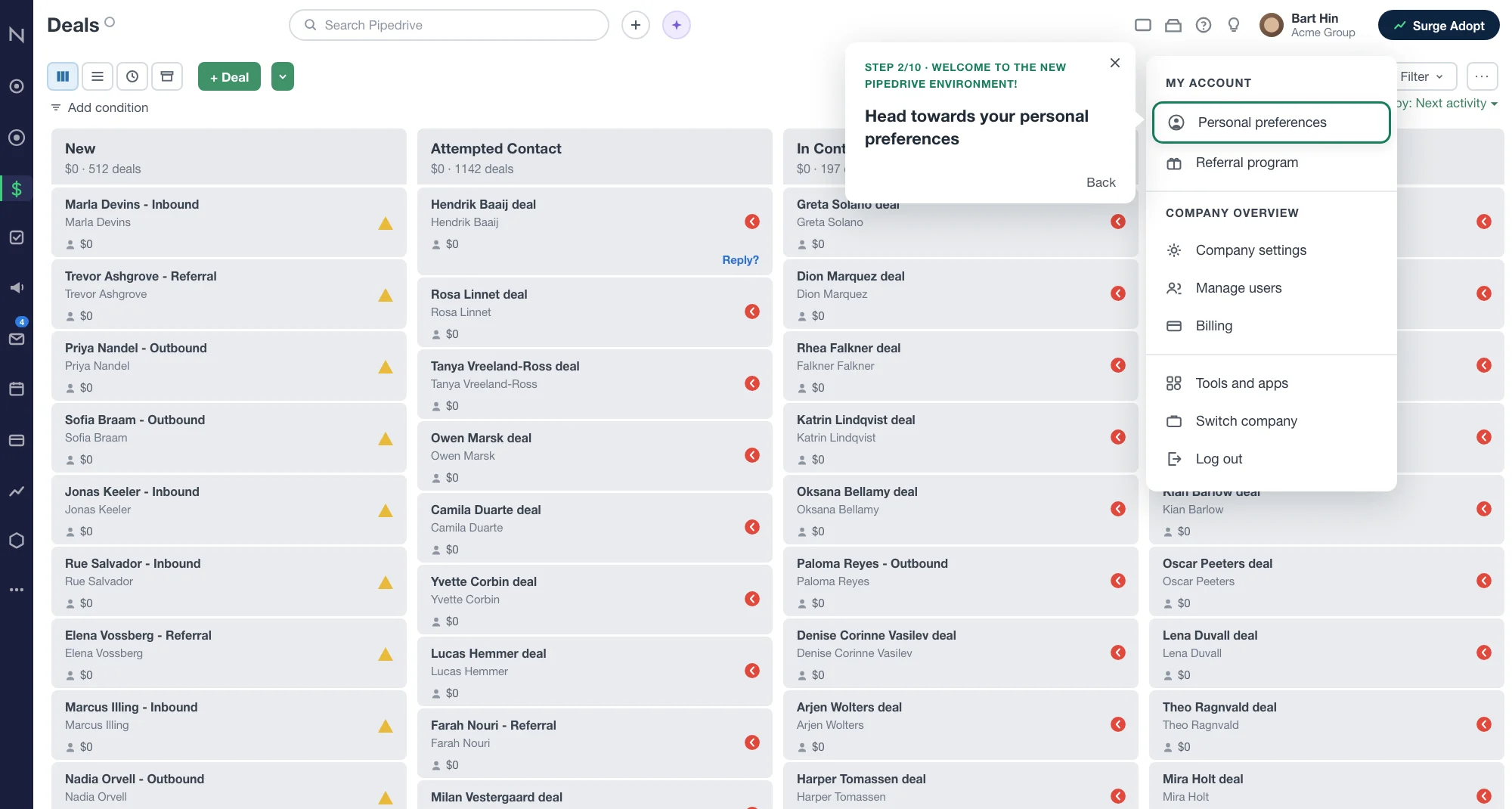
Help on the screen itself
Guidance shows up where the user is, not in a manual nobody opens.
Field checks on a deal
See what is missing before a colleague or a report asks for it.
Content you manage
Admins change the guidance and the checks without a new release of the extension.
Two limits
Surge Adopt runs in a desktop browser, in Chrome or Edge. People who update Pipedrive on their phone see none of it. For a field sales team, required fields in Pipedrive itself work better. And if your setup is wrong, Surge Adopt only points at it more neatly. Fix the setup first.
Built for Pipedrive

Built by a Pipedrive Platinum Partner, top 8 worldwide since July 2026.
What it costs
What it costs
- Plan: Per completed tourPrice: €15 per completed tour
In short
Surge Adopt is a Chrome extension that lays guidance and field checks over Pipedrive. New users get a walkthrough on the screen they are actually on. Existing users see which fields on a deal are still empty. Admins set the rules and see who finished which tour. You pay 15 euros per completed tour.
Source: Sales Surge, product information November 2026
What is Surge Adopt built for?
For the weeks after go-live. By then the rules for filling in the CRM live in a manual or in two people's heads, not on the screen where the work happens. New hires learn from whoever sits next to them, and a deal without a close date only stands out when the forecast is off. Why adoption slips like this is covered in our article on CRM user adoption.
On our implementations up to 90 percent of users keep working in the CRM. That is an outcome across projects, not a promise for your team. Surge Adopt is the tool we were missing to hold on to it after go-live.
How does Surge Adopt work?
Four steps. The first takes each user a couple of minutes. An admin does the other three once and tunes them from there.
- Install the extension. Each user adds Surge Adopt for Pipedrive from the Chrome Web Store and clicks Connect with Pipedrive. There is no server address, key or token to enter. An admin can also push the install to everyone through Google Workspace or Microsoft Edge policy.
- Build a tour. In the admin area you put a walkthrough together: which screen, which field and what to say about it. You edit the text yourself.
- Set field checks. A rule says when it applies and what has to be true. For example: once a deal reaches the Proposal stage, the deal value must be filled in. You choose whether the rule informs, warns or blocks.
- Measure completed tours. A tour counts as completed when a user has finished every required step. You see per user what is done and what is not. The same count is what the price is based on.
What a sales rep sees: a checklist in the bottom right with what is still open, a callout on the deal page next to the field that needs attention, and a marker on empty fields with a short note on why it matters.
What an admin sees: the tours and rules for their own company, the role of each user and progress per tour. The first person to connect from a Pipedrive account is marked as admin, so check the roles once after a team-wide rollout.
Which fields can you check?
Any standard field and any custom field on a deal, person or organization. A rule can test whether a field is empty, has a given value, is above or below a number, or is older than a number of days. A few rules we set up often:
| Field | Example rule | Why it matters |
|---|---|---|
| Expected close date | Required from the Proposal stage | Without a date the deal drops out of the monthly forecast |
| Deal value | Above zero once a quote is out | A pipeline full of zero-value deals says nothing about revenue |
| Next activity | Every open deal has a planned activity | A deal with no next step goes quiet |
| Lead source | Required on create | Otherwise nobody knows which channel brings the deals |
| Lost reason | Required when marked lost | Without a reason you learn nothing from the deals you lose |
One lesson from practice: start with three rules, not fifteen. A screen covered in markers gets dismissed. Only switch on blocking for a field you truly cannot do without.
How do you measure adoption with Surge Adopt?
With three counts you repeat every week. Logins tell you very little. What matters is whether the work sits in Pipedrive the way you agreed.
- Fields filled per deal. Take the five fields your forecast depends on and count how many are filled on each deal. Compare that by stage.
- Deals without an activity. The number of open deals with no planned next activity. This number should head towards zero.
- Tours completed per user. Who finished onboarding and who stopped halfway? Surge Adopt shows that per user.
You get the first two counts from Pipedrive itself or from Surge Reports. Put them next to the count from Surge Adopt and you see whether a rule has landed or only exists on paper.
What does Surge Adopt cost?
15 euros per completed tour, excluding VAT. Your first 5 completed tours are free. That allowance is one-off per Pipedrive account and does not reset each month.
A tour is only ever charged once, even if the same user runs it again. A tour someone starts but does not finish costs nothing. Roll one onboarding tour out to 20 users, have all of them finish it, and you pay for 15 tours.
Installing the extension is free. You only pay for what a user actually completes.
Questions we often get
Short answers. Anything else, ask us directly.
Is Surge Adopt available now?
Yes. The Surge Adopt for Pipedrive extension is in the Chrome Web Store and you can install it today. Then click Connect with Pipedrive, sign in and give permission once. Refresh your Pipedrive tab and the checklist appears in the bottom right.
Does it work in Edge or Brave?
In Microsoft Edge, yes. The extension is built on Manifest V3, the standard for Chromium browsers, and installs in Edge from the Chrome Web Store once extensions from other stores are allowed. Brave is Chromium too, but we do not test on it. Safari and Firefox are not supported.
Can the extension see my customer data?
It reads the page to find the right field and draws its guidance next to it. The content of your deals is not stored and not sent anywhere. One kind of data reaches us: which tour step someone saw or finished, and whether the field was found on screen. Those are keys and timestamps, no text from your CRM. On any site other than pipedrive.com the extension does nothing.
Can I build tours in Dutch and English?
Yes. Guidance is available in Dutch and English, and each user picks their own language in the extension. With a mixed team you write a tour in both languages. Start with the language most of your team works in and add the second once the first tour runs well. Admins edit the text themselves in the admin area.
How do I roll it out to 20 users?
Do not ask all twenty to find it themselves. On Google Workspace you set the extension to force install in the admin console. In Microsoft Edge you do the same through group policy or Intune. Start with a test group of two or three people. After that each user connects their own browser to Pipedrive with one click. You cannot do that step for them, because the connection lives in their own browser profile.
What counts as a completed tour?
A tour is completed when one user has finished every required step of one published walkthrough. So it is always one user and one tour. If the same user repeats the same tour, it is still one completed tour. A tour someone starts and leaves unfinished is not completed. Optional steps do not count. In the admin area you see per user which tours are done and where someone got stuck.
Further reading
- CRM user adoption
Why teams slide back after go-live and what to do about it.
- Why CRM implementations fail
The patterns that often show before go-live.
- Pipedrive implementation
A setup that is right before you lay guidance over it.
- Fix your sales pipeline
When deals get stuck in a stage and the forecast stops adding up.
- Surge Setup
An industry-specific Pipedrive setup as a starting point.
- Surge Adopt on the Chrome Web Store
The listing where you install the extension.
See who uses your setup.
Install the extension from the Chrome Web Store and build your first tour.