

Surge Service: a Pipedrive helpdesk with SLA tracking.
Turn support signals into pipeline.
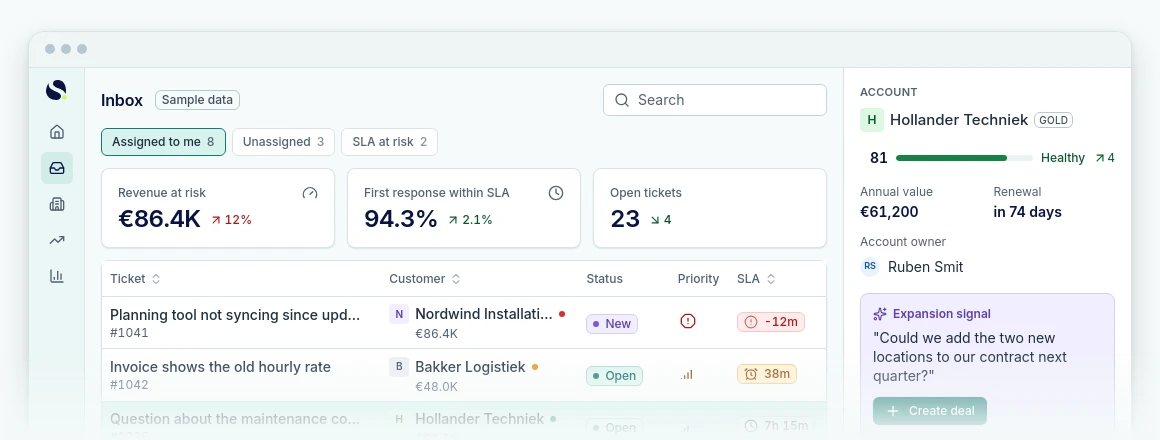
Tickets sit on the right customer and deal.
- Solves
- Support runs outside Pipedrive, so sales hears too late that a customer is at risk or ready to grow.
- Who it is for
- Teams with a shared support inbox next to Pipedrive
- Price
- Fixed monthly price, on requestBeta, free for 14 days
- Implementation
- €500 one off, excluding VATSet up by Sales Surge. The licence is separate.
- Works with
- Pipedrive, Forwarded email, Web forms, Customer portal and help center
What it does
Every request on the right customer
Email and web forms become tickets on the right customer and deal.
SLAs that know your hours
The SLA policy accounts for business hours and holidays. A paused ticket stops the clock.
Signals become follow-up
On the revenue plan churn risk opens a retention deal and an expansion signal lands as a lead.
What you should know
It is still listed as beta. AI summaries and draft replies are optional, and a person reviews and sends every answer. Phone support and live chat are not part of it.
Built for Pipedrive

Built by a Pipedrive Platinum Partner, top 8 worldwide since July 2026.
In short
Surge Service is a helpdesk inside Pipedrive. Forwarded support email, web forms and the customer portal become tickets on the right person, organization and deal. It tracks SLAs against your business hours and holidays. From the growth plan every customer gets a health score, and on the revenue plan churn risk becomes a retention deal. You pay a fixed price per company per month, with a 14 day free trial. It is in beta.
Source: Sales Surge, product information November 2026
Can you track SLAs in Pipedrive?
Not in Pipedrive on its own. Pipedrive has deals, activities and goals, but no tickets with an agreed response time. Surge Service adds that, inside your own Pipedrive account.
An SLA has two clocks: first response and resolution. Both run on your business hours. A ticket that arrives at five on Friday does not start counting until Monday morning if you are closed at the weekend. Holidays are skipped per policy.
- Paused time does not count. When a ticket waits on the customer or is on hold, the resolution clock stops. It picks up again as soon as the customer replies.
- Policies per customer. A customer on a heavier service contract gets their own SLA policy. On the revenue plan you tie that policy to the product on the won deal.
- You see it coming. Every ticket shows how much time is left. A missed target is recorded and feeds into that customer's health score.
How does a ticket get into your Pipedrive helpdesk?
Through forwarded email, a web form or the customer portal. Most teams start with email, because the customer does not have to change anything.
- Your support mailbox, say support@ on your own domain, forwards every message to a dedicated Surge Service address. You set that up once in Gmail or Microsoft 365.
- Surge Service turns the message into a ticket and links it to the person, the organization and the deal in Pipedrive.
- A reply from Surge Service reaches the customer as a normal email. When they answer, the answer lands in the same ticket.
- Alongside email you can put a web form on your site and let customers follow their own tickets in the portal. The help center handles the questions that keep coming back.
What is customer health, and how does churn risk become a deal?
Customer health is a score from 0 to 100 per customer, built from what your helpdesk and Pipedrive already know: missed SLAs, open tickets, ticket tone, CSAT, NPS and how long it has been since anyone checked in. No product usage data is needed. Customer health comes with the growth and revenue plans.
From 70 a customer is healthy, from 45 to 69 they need attention, and below 45 they are at risk. With too little data Surge Service shows no score rather than a guess. Each score lists the factors behind it.
An example. A customer on an annual contract reports the same problem four times in three weeks. Two tickets miss the SLA and the latest CSAT is a 2. The score drops below 45. On the revenue plan Surge Service then opens a deal in a Retention pipeline worth the revenue at risk, adds a note with a rescue plan and schedules a call for the account manager. If the customer stays, you mark the deal won. If they leave, lost. Churn then sits in your pipeline next to new business.
It works the other way too, and that is also part of revenue. When a customer asks in a ticket about another team or a bigger plan, that signal can become a lead or a deal, with the quote and a link to the ticket attached.
Surge Service or a standalone helpdesk like Zendesk or Freshdesk?
A standalone helpdesk is not a bad choice. Zendesk and Freshdesk are mature products with many channels. The real question is where support work should land, and who sees it afterwards.
| Surge Service | Standalone helpdesk | |
|---|---|---|
| Where tickets live | In Pipedrive, next to person, organization and deal | In a separate system, synced to the CRM |
| Built for | Small support teams, account managers and customer success | Large support teams with their own team leads |
| Channels | Email, web form and customer portal | Often phone, chat and social on top |
| Churn and upsell | Become deals in your own pipeline | Usually stay inside the helpdesk |
| Phone queues | Not included | Often built in or available through an integration |
If you run a support team of dozens of people with their own team leads, a standalone helpdesk fits better. If your support revolves around customers on a contract, and you want sales and support looking at the same customer, Surge Service is the shorter route.
What does Surge Service cost?
A fixed price per company per month, on one of three plans: starter, growth and revenue. The number of active agents differs per plan. At the time of writing the split looks like this:
- Starter: the helpdesk itself. Email channels, customer portal, SLAs, macros and basic reporting.
- Growth: everything in starter, plus customer health, playbooks, NPS and advanced reporting.
- Revenue: everything in growth, plus a queue ranked by customer value, SLAs sold as a product on the deal, retention, signals to pipeline, a forecast and AI drafts.
Every install starts with 14 days free on revenue, so you can try all of it. Ask for the current price per plan in the app or on a short call.
Questions we often get
Short answers. Anything else, ask us directly.
Is Surge Service a separate helpdesk?
Not quite. Your support team works in the Surge Service app, but the person, organization and deal come from Pipedrive, and the tickets sit there next to the deal. There is no second customer database for the helpdesk, so nothing to migrate or keep in sync by hand.
Does it work with several support mailboxes?
Yes. Each mailbox gets its own forwarding address, so support@, billing@ and a mailbox per country can sit side by side. You forward each address once from Gmail or Microsoft 365. The catch: with twenty mailboxes it gets messy quickly. Start with the two or three addresses customers actually write to.
Can customers see their own tickets?
Yes, in the customer portal. A customer sees their own tickets and the replies there, and can raise a new request through a form. Your team's internal notes stay hidden from them. Next to the portal there is a help center with articles, so recurring questions are answered before they turn into tickets.
Does a paused ticket count towards the SLA?
Not for the resolution target. When a ticket waits on the customer or is on hold, that clock stops and the paused time is taken off later. The clock also only runs during your business hours, and holidays do not count. The first response target keeps running until someone on your team replies.
Does the AI send replies on its own?
No. AI summaries and draft replies are optional. A draft points to the messages and agreements it is based on. Sentences that promise money or a deadline without a source behind them are flagged. An agent edits the draft and sends it. No reply ever goes out by itself.
What happens after the beta?
The beta does not run in a separate test environment. What you set up now, such as mailboxes, SLA policies and help center articles, lives in your own account. After the 14 day trial you pick a plan or you stop. During the trial everything in revenue is switched on, so you can see which plan you actually need.
Can you run customer service in Pipedrive?
Only partly with Pipedrive on its own. You can keep email and activities on a person, and for a handful of questions a week that is enough. Tickets with a status, an SLA clock and a customer portal are not part of Pipedrive itself. Once support becomes a daily process, Surge Service adds them, on the same person, organization and deal from Pipedrive.
Further reading
- Surge Reports
Reporting across deals and pipeline that native Pipedrive cannot do.
- Surge Chat
A chat on your site that qualifies questions and sends the lead to Pipedrive.
- Pipedrive
What we set up and build as a Pipedrive Platinum Partner.
- RevOps
Retention and expansion as a fixed part of your revenue process.
- RevOps knowledge hub
Background on measuring retention and churn.
Put your support next to your deals.
Try Surge Service free for 14 days in your own Pipedrive.